
The diff tool built for PowerBuilder

pb-diff compares every PowerBuilder object type the way PowerBuilder builds it, and shows every change where it belongs: in a function, an event, a control, or a single DataWindow property. For developers and teams who maintain PowerBuilder applications, in-house, at consultancies and at software vendors.
Developers review changes in a dedicated desktop view. AI coding agents get the comparison as structured JSON from the command line.
diff built for PowerBuilder

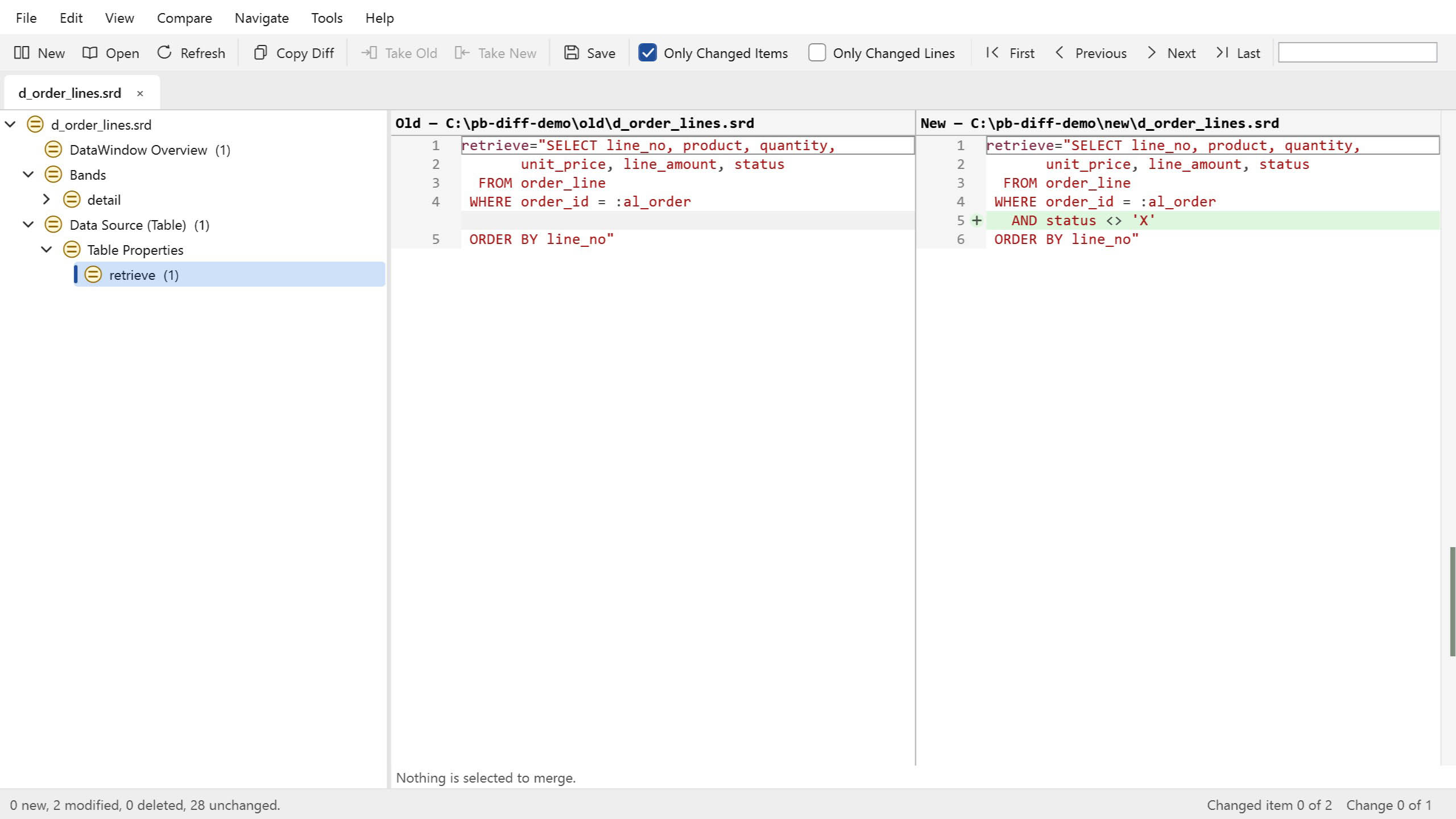
The retrieve SQL of the d_order_lines DataWindow is a node of its own. The new version excludes cancelled lines, and the added condition is the only highlighted line.

  • See what changed in an object

    OEvery PowerBuilder object type, from windows, user objects and menus to queries, pipelines, projects and DataWindows, gets a view that follows its own structure, down to a single DataWindow property. Sections that were only reordered are not a change.

  • Find damaged libraries

    Libraries get damaged, and the damage is found late. Tools ▸ Verify Libraries checks every library of a workspace, Solution, folder or series of builds, naming the object and the remedy; validate does the same in both commandline tools. It finds damage, never repairs it.

  • Let an AI agent work on PowerBuilder code

    pb-diff-cli gives the agent the comparison as versioned JSON, with published schemas and documented exit codes. Agent workflows in the CLI reference and an included skill.

  • Move to PowerBuilder 2025 Solutions

    Compare a library with the Solution it became: objects that did not change compare identical, apart from OLE control data. A merged source stays UTF-8, with no export header added.

  • Check every build in the pipeline

    pb-diff-ci compares two releases and checks the libraries on the build server, with no licence to manage, and writes the summary as a build report.

  • Compare two whole releases

    Give pb-diff the folders of two releases: it finds the libraries, exported sources, Solution folders and build files, compares each object once and shows what changed in the code and in the build. PBL files are read directly, readonly, without PowerBuilder or ORCA.

  • Merge the work of several developers

    A three-way merge applies the changes made on one side only and lists conflicts by function, event or control. Create and destroy scripts and the control list stay consistent, and no conflict marker is ever written into PowerScript.

  • Review changes from Git, SVN or the IDE

    The PowerBuilder IDE Diff Viewer, even with no other client; TortoiseGit and TortoiseSVN supported directly; Git and other visual Git clients. A registered PBL opens as a library comparison, not a binary file.

  • Show a manager or auditor what changed

    Reports as PDF, HTML, CSV, JSON or RTF, readable without pb-diff; the command-line tool writes them for a nightly job too.

  • Requirements

    Windows 10 or 11, or Windows Server 2016 and later. PowerBuilder 10 and later libraries; merged-file import verified from PowerBuilder 19; PowerBuilder 2025 Solutions.

What it does not do

It does not decompile PBD files, write into PBL files (so it does not repair them) or compile code: build merged results in PowerBuilder.

PowerBuilder, PowerScript and DataWindow are trademarks or registered trademarks of SAP SE or an SAP affiliate company. All other product and company names mentioned may be trademarks of their respective owners. pb-diff is an independent product of RESTORE S.R.L. It is not affiliated with, endorsed or sponsored by SAP, Appeon or any other company named.